Transferring files from your host machine into the DaDesktop environment
One feature that has long been asked for is the option to copy files straight from a Trainer's laptop or desktop into the DaDesktop environment. These could be presentation files, ISO images for setting up a nested virtualisation system that lets you run several servers and desktops, or simply general files needed for the training session at hand.
We've introduced a simple file transfer capability in our newest Win 10 and the majority of Linux templates. Files can be conveniently dragged and dropped from the host machine (that is, your own laptop or desktop) right into the DaDesktop workspace.
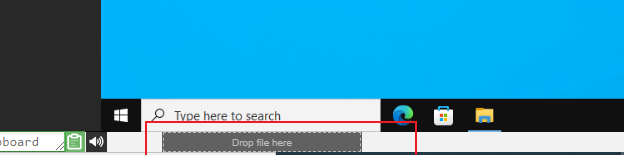
For now, the transfer only handles one file at a time. If you need to move multiple files, just bundle them into a zip archive and drag and drop that as well. The system uses chunking to send large files efficiently, and it performs best over a swift fibre internet link. Folders inside the archive (such as within a zip file) are preserved intact.
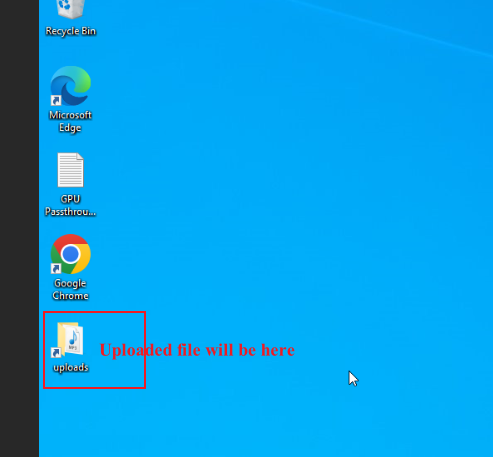
On Linux templates, there isn't yet a desktop shortcut for the Uploads folder like there is on Windows. Instead, you'll find the transferred files here :-
/home/student/uploads-to-dadesktop
To summarise:-
OS Templates that currently have this feature enabled
- Debian 12 – v20240314 and later
- Ubuntu 22.04 – v20240314 and later
- Ubuntu 24.04 – v20240314 and later
- Windows 10 – v67 and later
OS Templates that do not have this feature enabled (as yet)
- Debian 11
- Almalinux
- Kali-linux
- Any older template versions
Keep in mind that more updates for this early‑stage feature will be rolled out soon.
If you have any feedback or questions, reach out via our DaDesktop Technical support chat.